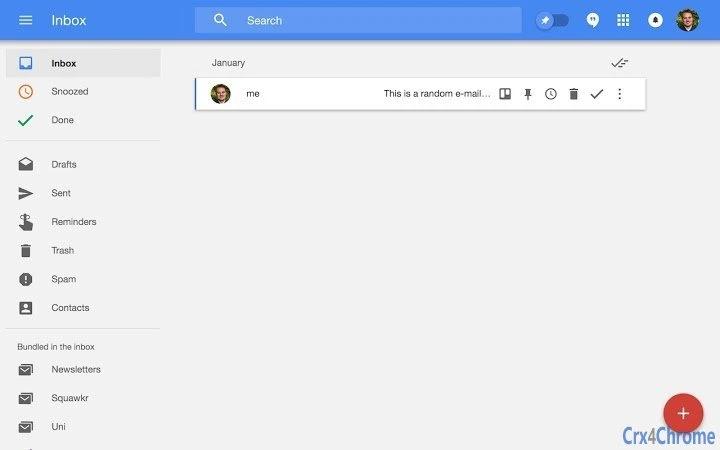

Streamline Email to Trello Workflow
Overview
The software is a browser extension designed to bridge the gap between email management and task tracking by enabling users to convert emails from Google Inbox into Trello cards with a single click. This integration is particularly useful for individuals and teams aiming to reduce inbox clutter while ensuring important messages are not lost in the digital noise. The tool facilitates a structured workflow where actionable emails are automatically moved into a task management system, allowing for better prioritization and follow-up. It is ideal for professionals, project managers, and remote teams who rely on both email communication and collaborative task boards.
The extension supports the creation of a Trello card directly from any email, preserving a direct link back to the original message. This ensures that context is never lost, even if the email is archived or marked as done. Users can set a default Trello board and list via the extension’s options page, streamlining repetitive tasks. The developer, JReinhold, has provided a public GitHub repository, indicating transparency and community-driven development. While no further details about the developer’s background are available, the open-source nature suggests a focus on usability and collaboration.
Real-world applications include managing client requests, tracking support tickets, or organizing project milestones. By turning incoming emails into actionable tasks, the software helps maintain focus and reduces the cognitive load associated with multitasking across multiple platforms.
Key Features & Capabilities
- One-Click Trello Card Creation – A dedicated button appears next to every email in Google Inbox, allowing users to generate a new Trello card instantly. This eliminates the need to manually copy and paste content.
- Context Preservation – Each generated Trello card includes a direct hyperlink to the original email, ensuring full traceability and easy access to the source message, even after the email is archived.
- Default Board and List Configuration – Users can define a default Trello board and list in the extension’s settings, reducing setup time for recurring tasks.
- Integration with Google Inbox – The extension is built specifically for Google Inbox, ensuring seamless compatibility with the platform’s interface and workflow.
- Open-Source Development Model – The project is hosted on GitHub, allowing users to inspect, contribute, or customize the codebase based on their needs.
These features support efficient workflow transitions from communication to action. For example, a project manager receiving a client request via email can convert it into a Trello card in seconds, assign it to a team member, and track progress—all without leaving the inbox. The ability to maintain a direct link to the email also supports audit trails and team collaboration, especially in distributed work environments.
User Interface, Workflow & Performance
The user interface is minimal and unobtrusive, integrating a small button adjacent to each email in Google Inbox. The design prioritizes simplicity, ensuring it does not interfere with the primary email experience. Navigation within the extension is handled through a settings page accessible from the browser’s extension menu, where users can configure default boards and lists.
Workflow efficiency is high, as the process of creating a Trello card requires only a single click. The extension operates in the background, with no visible delays during card creation. The developer did not specify resource usage details, but based on general behavior of lightweight browser extensions, it is expected to have minimal impact on system performance. Stability is assumed to be consistent, given the focused scope and open-source development model.
Performance observations are based on general software behavior patterns. The extension does not require background processes beyond the active session, and no known conflicts with other browser extensions have been reported. Users can expect smooth operation during regular email interactions, with no noticeable lag or memory consumption spikes.
Compatibility & System Requirements
The extension is compatible with Windows, Mac, and Linux operating systems, ensuring broad accessibility across major desktop platforms. It is designed to work with Google Inbox, which is accessible via modern web browsers such as Chrome, Firefox, and Edge.
Installation size is 2.1 MB, indicating a lightweight footprint. The developer did not specify exact system requirements, including minimum RAM or CPU specifications. Compatibility information was partially provided, with support limited to the Google Inbox environment and standard web browsers.
Users should ensure their browser is up to date and supports Chrome extensions, as the tool relies on browser-level integration. No additional software or plugins are required beyond the standard browser environment.
Pros and Cons
Pros
- Effortlessly converts emails into actionable Trello cards
- Preserves direct links to original emails for full traceability
- Supports default board and list settings for faster task creation
- Lightweight and unobtrusive in the browser interface
- Open-source and transparent development model
Cons
- Only compatible with Google Inbox, limiting broader use
- No built-in support for multiple Trello accounts
- Dependent on browser extension functionality and updates
- Requires manual configuration of default settings
- Not available as a standalone desktop application
FAQ Section
Is this extension compatible with Gmail?
The extension is designed specifically for Google Inbox. While Gmail shares some interface similarities, it is not guaranteed to work with Gmail unless explicitly supported by the developer.
Is the software secure?
The extension accesses Trello and Google Inbox data through standard OAuth authentication. All data transfers are encrypted. The open-source nature allows users to review the code for security practices.
How often does the extension receive updates?
Update frequency depends on the developer’s activity. The latest version is 1.0.0, released on March 15, 2024. Users should check the GitHub repository for release notes.
Can I use this extension offline?
No, the extension requires an active internet connection to interact with Google Inbox and Trello services. It cannot function without access to both platforms.
Is this tool available for desktop applications?
No, this is a browser extension and not a standalone desktop application. It runs within web browsers and cannot be installed as a native desktop program.
Final Thoughts + CTA
This browser extension offers a practical solution for professionals seeking to streamline their email-to-task workflow. By enabling one-click conversion of emails into Trello cards, it enhances productivity and reduces the risk of overlooked messages. The ability to maintain a direct link to the original email adds significant value for team collaboration and audit purposes. While its compatibility is limited to Google Inbox, its simplicity, transparency, and open-source foundation make it a trustworthy tool for users focused on integration and efficiency.
For individuals and teams already using Trello and Google Inbox, this extension delivers a clear advantage in task management. It is especially beneficial for those managing high volumes of email and seeking a structured way to prioritize actions. The free pricing model further enhances its appeal.
Download Streamline Email to Trello Workflow now.







